 DevPorts$9 · Buy
macOS menu bar app
Every dev server on your Mac, one click from stopped.
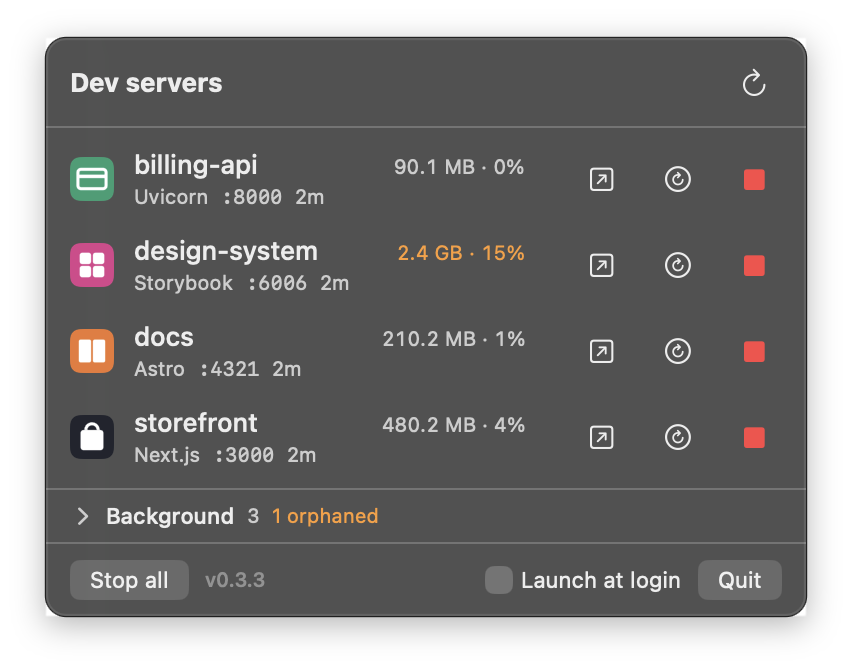
The pnpm dev from a closed tab. The watcher your coding agent left behind. The Storybook eating 2 GB. DevPorts shows them in the menu bar with project, port, uptime, and memory, and stops or restarts the one you pick without taking anything else down.
One-time purchase · macOS 14+ · Apple silicon & Intel
Instead of this
$ lsof -nP -iTCP -sTCP:LISTEN
rapportd    860  *:60164
ControlCe  1020  *:7000
ollama     1781  127.0.0.1:11434
node       3619  127.0.0.1:3000
OrbStack   6814  *:54322
node      96623  127.0.0.1:3310
Cursor    57001  127.0.0.1:60191
... 31 more lines

$ ps -o pgid= -p 3619   # which of these is safe to kill?
You scan past system daemons, guess which node is which project, then kill a pid and hope the package manager above it doesn't restart it.
DevPorts does that lookup every few seconds and shows only the servers that belong to your projects.
Stop
Stops the whole server. Leaves the rest alone.
Clicking Stop on next-server also takes down the next dev and pnpm above it and the workers below, so nothing respawns and the port is actually free.
In a turbo or concurrently setup, the sibling API keeps running. Your shell is never signalled, and a pid that was reused since the last scan is refused.
- zshnever signalled
- turbo run dev
- pnpm --filter storefront dev
- next dev --port 3000
- next-server :3000you clicked Stop
- node .next/build/worker.js
- pnpm --filter billing-api dev
- uvicorn app:main :8000
Jump in
Right-click to get where you're going.
Open the server in your browser, the project in Cursor, VS Code, Zed, or Xcode, a terminal in Ghostty, iTerm, Warp, or Terminal, or reveal it in Finder. DevPorts only lists the apps you have installed.
Restart
Restart without hunting for the tab.
DevPorts rebuilds the command that started the server, shows it to you, then stops the server and runs the command in a fresh Terminal window. You see exactly what will run before anything happens.
Restart storefront?
DevPorts stops the server, then runs this command in a new Terminal window.
cd ~/code/storefront && pnpm dev --port 3000Background
Find what your agents left running.
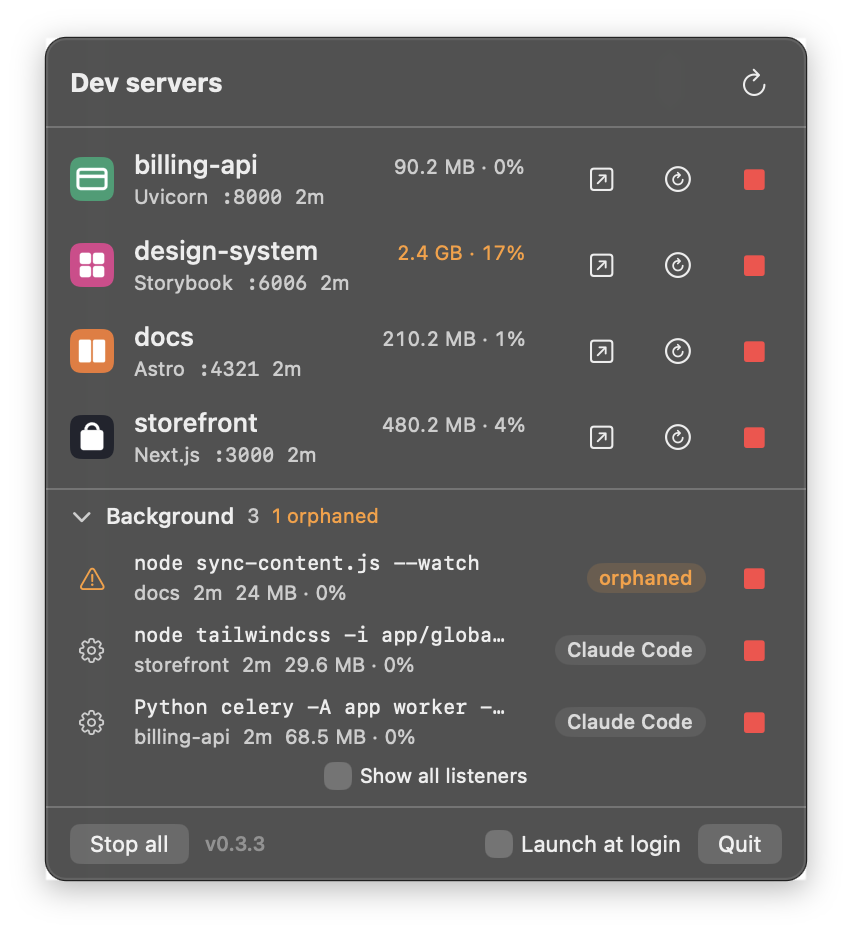
Watchers, workers, and orphaned processes don't listen on a port, so they hide from everything else. DevPorts lists them under Background with the command, project, memory, and which agent or terminal started them, or flags them orphaned.
Agents, editors, and their own MCP and language servers stay off the list, and stopping a background row always asks once more.
Scriptable
The same list from the command line.
--list prints every server with its ports, framework, memory, and path. --stop <pid> uses the same safe stop path as the button.
Link the binary once: ln -s /Applications/DevPorts.app/Contents/MacOS/DevPorts ~/.local/bin/devports
$ devports --list
48213  48190  3000        Next.js     486 MB  ~/code/storefront
51877  51860  8000        Uvicorn      92 MB  ~/code/billing-api
39120  39101  4321        Astro       214 MB  ~/code/docs
40588  40570  6006,6007   Storybook  2447 MB  ~/code/design-system

$ devports --stop 40588
stopped design-system: 40570 node, 40588 node
More
Only the dev servers
Processes that listen on a port and run inside a project folder. Chrome, OrbStack, your editor, and system daemons stay out of the list.
Knows what it's looking at
Next.js, Vite, Astro, Remix, Nuxt, Storybook, Uvicorn, Django, Rails, and more, each with the project's own favicon.
Safe around agents
Claude Code, Codex, Cursor, Grok, and other agents, editors, and terminals are never listed, and every stop re-checks the process tree before it signals anything.

DevPorts 0.3.5
$9
One-time. No subscription, no account.
- Dev servers with memory, CPU, ports, and uptime
- Background watchers, workers, and orphaned processes
- Stop, restart, and open in your editor or terminal
- Launch at login and a command-line interface
- All future updates included
- 14-day refund, no questions asked
You'll download a .dmg right after paying. Requires macOS 14 or later. What's new · Terms
Questions
macOS says it can't verify the developer. Is that expected?
Yes, for now. This build isn't notarized by Apple yet. After dragging DevPorts to Applications, open it once, then go to System Settings → Privacy & Security and click Open Anyway. macOS remembers the choice.
What counts as a dev server?
A process you own that listens on a TCP port and whose working directory is inside a project, meaning a folder with package.json, pyproject.toml, requirements.txt, Cargo.toml, go.mod, Gemfile, composer.json, deno.json, mix.exs, or manage.py.
Could it stop the wrong thing?
It checks the process start time right before stopping, so a reused pid is refused. It only climbs to parents that exist solely to run that server, and it never signals shells, launchd, other users' processes, or sibling servers. Coding agents (Claude Code, Codex, Cursor agent, Grok, Hermes, Gemini, Aider, OpenCode), editors, terminals, and apps are never listed, and every stop re-checks the whole process tree and refuses if one of them is in it.
What does the Background section catch?
Dev processes that never open a port: tsc --watch, nodemon, tailwind watchers, Celery or Sidekiq workers, and processes orphaned when an agent or terminal session ended. Each row says which agent or terminal started it, or marks it orphaned. Language servers and MCP servers that an editor or agent runs for itself are left out. Stopping a background row always takes a second click to confirm.
What does Restart run?
The command that started the server, rebuilt from the process (for example pnpm dev --port 3000), in a new Terminal window so you see the output. It always asks first and shows the exact command. Environment variables are not copied, so anything you exported in the original shell has to come from your project's own config.
Does it see servers in Docker or OrbStack?
No. Containers show up as the container runtime, which DevPorts skips on purpose. Use your container tool for those.
Does the app phone home?
No. The only network requests DevPorts makes are favicon lookups to your own servers on localhost, capped at 1 MB. The app has no account, analytics, or license server. This website uses DataFast cookieless analytics to count visits.
How do I get updates?
Every future update is included. We email your download link after checkout, and it always serves the newest version: download again and replace DevPorts in Applications. The changelog lists what changed in each release. Lost the email? Get the link again at devports.xyz/recover.
Can I get a refund?
Yes. Email us within 14 days of buying and you get a full refund, no questions asked. The terms have the details.
How do I pay?
Checkout runs on Stripe, sold through Link as the merchant of record, and Link emails your receipt.